Choose off-the-shelf AI when the task is common, your data already lives in the vendor’s ecosystem, and you need results this quarter. Choose custom AI when the workflow is how you compete, it depends on your own data and systems, and generic tools keep forcing workarounds. Most mid-sized companies end up with both: off-the-shelf AI for everyday productivity, and one or two custom builds where the edge actually lives.
We build custom AI for a living, and we still tell most teams to start by buying. This guide shows you how to tell the difference for your own workflows, with real prices, a scorecard you can use in a meeting, and the tradeoffs vendors on both sides tend to skip.
“Half of our discovery calls end with us recommending a tool the client can buy. The other half end with a short list of one or two workflows where nothing on the market fits, and that’s where custom AI earns its cost.”
Key takeaways
- Off-the-shelf AI is ready-made software with AI built in, like Microsoft 365 Copilot, ChatGPT Enterprise, Salesforce Agentforce or Zendesk AI. It goes live in days and is priced per seat or per use.
- Custom AI is AI built around your workflows, data and rules. A focused first build usually takes 8–16 weeks and costs $25,000–$180,000.
- Buying has the better track record: MIT found AI bought from specialist vendors or built with partners succeeds about 67% of the time, versus roughly a third as often for purely internal builds.
- Seat costs grow with headcount: 200 seats of Microsoft 365 Copilot cost $72,000 a year at the $30 enterprise list price, before any base license. Licensing only the team that needs AI is usually cheapest, and a custom tool pays off only when it handles work the licensed tool can’t.
- Decide per workflow, not per company. Score each workflow on differentiation, data, integration, volume and risk, then buy, configure, or build.
- Red flag: if staff copy data between the AI tool and other systems more than twice per task, integration cost is eating the subscription’s value.
What the data says in 2026
- 95% of enterprise generative AI pilots showed no measurable profit-and-loss impact in MIT NANDA’s preliminary 2025 study, and the cause was poor fit with workflows rather than weak models (MIT NANDA via Fortune).
- About 67% of AI deployments bought from specialist vendors or built with partners succeeded, compared with roughly one-third of that rate for internal builds (MIT NANDA, The GenAI Divide 2025).
- 32% of organizations decided against buying at least one software product because they could build it in-house with agentic coding tools (McKinsey, The State of AI in 2026).
- 1 in 5 organizations say AI operating costs, including token fees, limit how much they use AI (McKinsey, 2026).
- Over 40% of agentic AI projects will be canceled by the end of 2027, and Gartner estimates only about 130 of the thousands of vendors selling “agentic AI” offer real agent capabilities (Gartner).
- $30 per user per month is the list price for Microsoft 365 Copilot on an annual commitment, on top of a qualifying Microsoft 365 license (Microsoft, 2026).
What is the difference between custom AI and off-the-shelf AI?
Off-the-shelf AI is a product you subscribe to and adapt your work around, while custom AI is software built to fit your work. The difference is not the model underneath. Both often run on the same models from OpenAI, Anthropic or Google.
What differs is who decides how the AI behaves, what data it sees, which systems it touches, and who owns the result. With off-the-shelf AI, the vendor decides. With custom AI, you do, and you also take on the job of keeping it working.
Is it really a two-way choice?
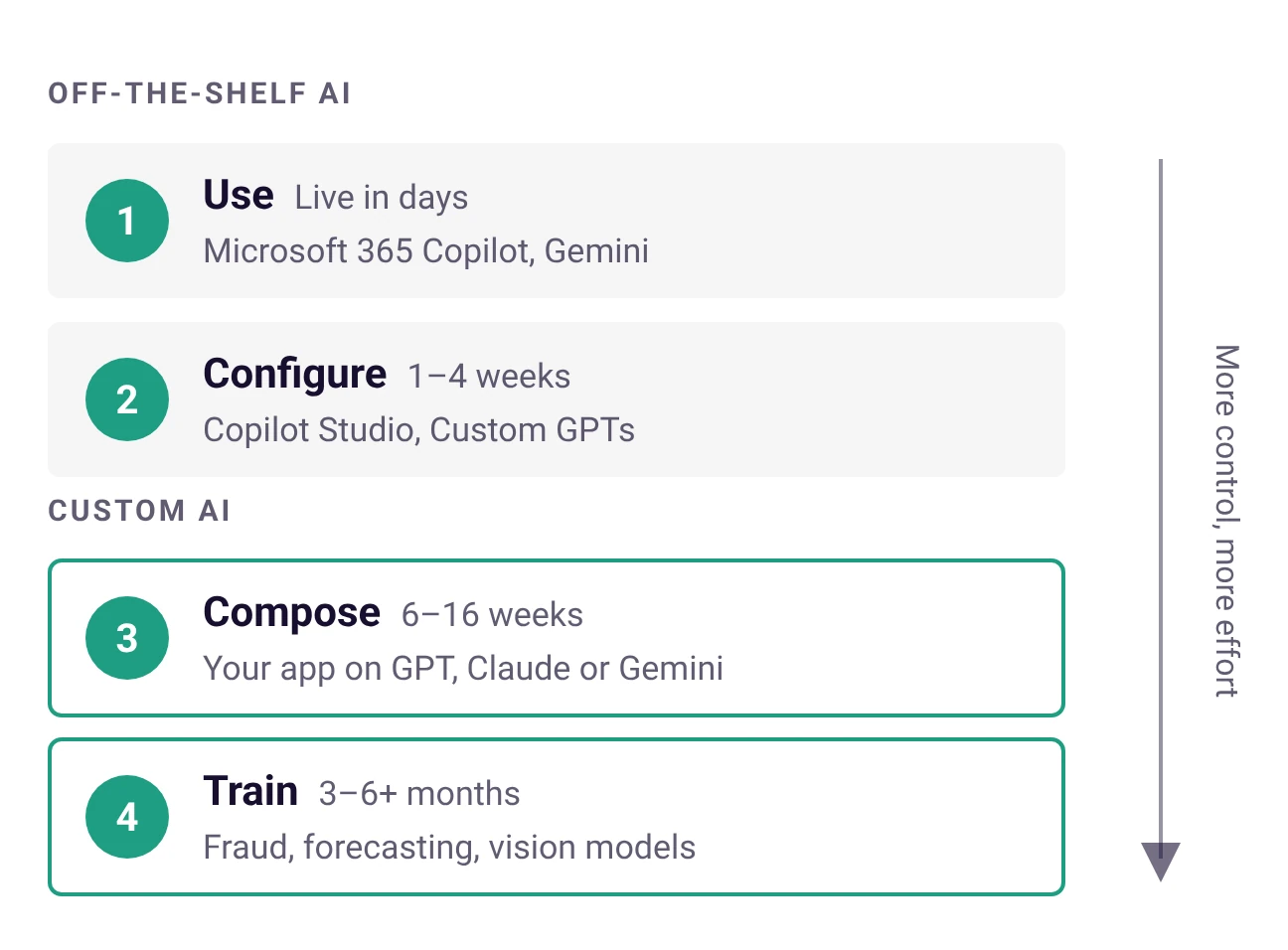
No, it’s a spectrum with four levels, and naming the levels prevents most bad decisions. Teams that argue “build vs buy” are often arguing about different levels without realizing it.
| Level | What it means | Examples | Typical time to value |
|---|---|---|---|
| 1. Use | Turn on AI features inside software you already pay for | Microsoft 365 Copilot, Gemini in Google Workspace, Notion AI | Days |
| 2. Configure | Set up agents or assistants on a vendor’s builder | Copilot Studio, Custom GPTs, Agentforce, Zapier AI | 1–4 weeks |
| 3. Compose | Build your own app on top of foundation model APIs | An app using GPT, Claude, Gemini or Llama with your data and rules | 6–16 weeks |
| 4. Train | Train or fine-tune your own models | Fraud scoring, demand forecasting, computer vision on your images | 3–6+ months |
Swipe sideways to see the full table.
Levels 1 and 2 are off-the-shelf AI. Levels 3 and 4 are custom AI. Most custom AI projects today sit at level 3, which is far cheaper and faster than the “train your own model” picture many buyers still have in mind.
What does off-the-shelf AI involve?
Off-the-shelf AI involves choosing a vendor, connecting it to your accounts, setting permissions, and training your team to use it well. There’s no code to write, but there is real setup work, and skipping it is why many rollouts stall.
Knowing what off-the-shelf AI involves beyond the subscription keeps rollouts on track. Here’s what a solid rollout actually includes:
- Data hygiene first: tools like Copilot surface whatever a user can access. If your SharePoint permissions are messy, the AI will happily show people files they shouldn’t see.
- Connector setup: linking the tool to your CRM, help desk or drive so it can answer with your information.
- Usage rules: what staff can paste in, which outputs need review, and who approves new use cases.
- Adoption work: short training, a few champions per team, and tracking who actually uses it after month two.
Key features of off-the-shelf AI: fast deployment, vendor-managed updates and security, predictable per-seat or per-use pricing, built-in compliance certifications, and a large user community.
What does custom AI software development involve?
Custom AI software development involves defining one measurable goal, checking your data, building the application around a model, testing it on real cases, and running it in production. Expect 2–4 weeks of discovery and 8–16 weeks to a first production release for a focused scope.
Knowing what custom AI software development involves upfront keeps budgets honest. The work breaks into a few parts:
- Discovery: pick one workflow, write down today’s baseline, and confirm the data exists and can legally be used.
- Architecture: choose the model approach, usually a hosted model plus retrieval from your own documents.
- Build: the app, integrations, permissions, an exception path for cases the AI can’t handle, and logging.
- Evaluation: a test set of a few hundred real cases the system must pass before each release.
- Run: monitoring, cost controls and regular updates as models and data change.
We cover each stage with timelines and budgets in our guide to the custom AI software development process and costs.
Key features of custom AI: fits your exact workflow, deep integration with internal and legacy systems, full control over data location and access, your rules for approvals and escalation, and ownership of code, prompts and evaluation sets.
How do the costs of custom AI and off-the-shelf AI compare?
Off-the-shelf AI is almost always cheaper in year one, but its cost grows with headcount, while custom AI costs more upfront and grows with usage. Which one wins over three years depends on how many people need the tool and how much work it does.
Here’s an illustrative comparison for a 200-person company that wants AI help for its 40-person support team. It uses the $30 enterprise price; organizations under 300 users on Microsoft 365 Business plans can choose Copilot Business at $21 per user, about 30% less. Treat the custom figures as planning ranges, not quotes.
| Cost item | Off-the-shelf: Copilot for everyone | Off-the-shelf: Copilot for support only | Custom support assistant |
|---|---|---|---|
| Upfront | Setup and permission cleanup | Setup and permission cleanup | $60k–$120k build |
| Yearly license or running cost | $72,000 (200 × $30 × 12) | $14,400 (40 × $30 × 12) | $15k–$30k maintenance plus model usage |
| 3-year total | About $216,000 | About $43,200 | About $105k–$210k, plus model usage |
| What you get | General help in Word, Outlook, Teams | General help, not tied to the ticket workflow | Answers grounded in your help content, inside your ticket tool |
Swipe sideways to see the full table.
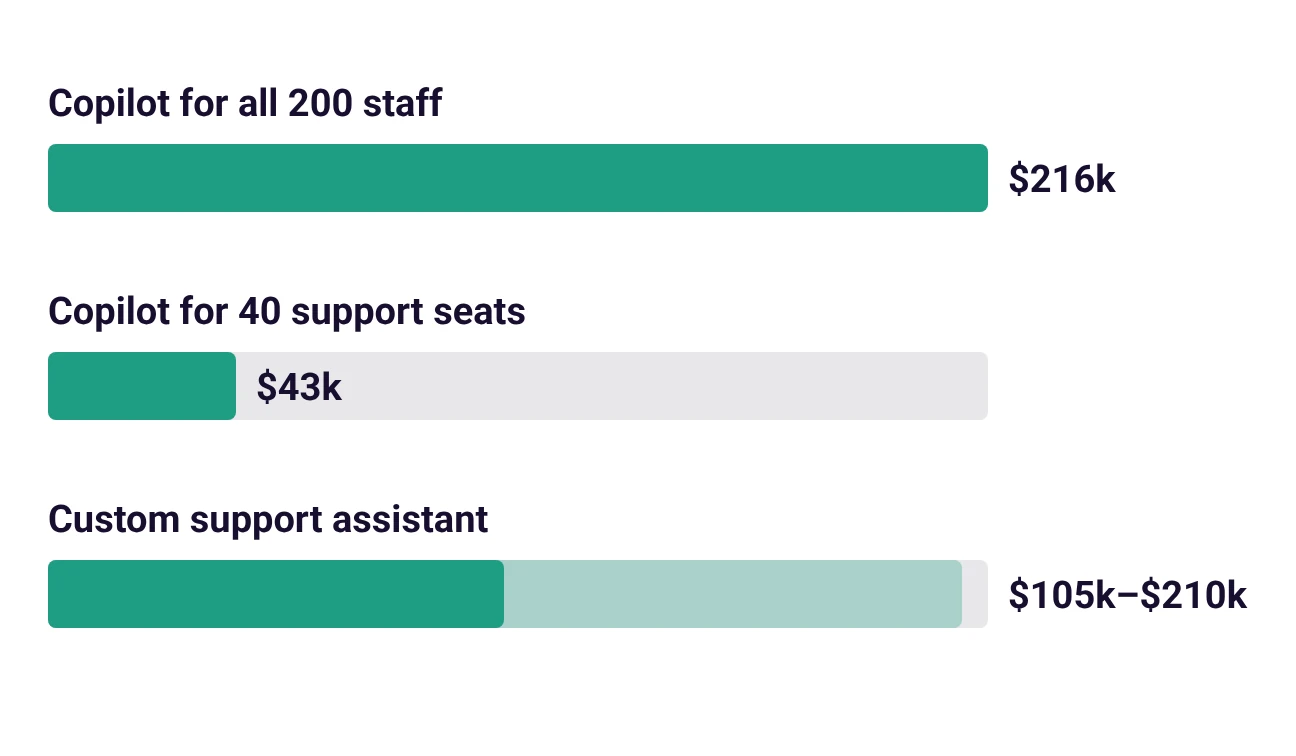
Notice what the table shows. If all you need is general writing and meeting help, the 40-seat license is the obvious answer. The custom build only makes sense if it resolves tickets the off-the-shelf tool can’t, because that’s where the money is.
Which costs do people forget on each side?
Off-the-shelf buyers forget base licenses, annual lock-in and the integration work around the tool, while custom buyers forget maintenance and model usage fees. Both sides underestimate the time staff spend on training and review.
- Off-the-shelf: qualifying base licenses, annual commitments, premium tiers for the features you actually wanted, usage credits for agents, and the cost of leaving when contracts end.
- Custom: 15–25% of build cost per year for upkeep, token or hosting fees that grow with usage, and someone on your side who owns accuracy after launch.
When is off-the-shelf AI the right choice?
Off-the-shelf AI is the right choice when the task is the same at your company as everywhere else and the tool already connects to where your data lives. For most productivity work, that’s the case.
Best for:
- Writing, summarizing and meeting notes across the whole company.
- Coding help, where tools like GitHub Copilot are hard to beat.
- Standard customer support on platforms you already run, such as Zendesk, Intercom or Salesforce Service Cloud.
- Teams new to AI that need to learn which use cases matter before investing.
- Companies with no one to own an AI system after launch.
Pros of off-the-shelf AI
- Speed: live in days, with value you can see this quarter.
- Lower risk: the vendor carries uptime, security patches and model updates.
- Proven at scale: thousands of companies have already hit the obvious bugs.
- Easy to start small: pilot with 20 seats before committing.
Cons of off-the-shelf AI
- Generic output: it doesn’t know your rules, pricing logic or edge cases.
- Shallow integration: great inside its own ecosystem, weak with legacy or in-house systems.
- Roadmap dependence: the feature you need ships when the vendor decides.
- No differentiation: your competitors can buy the exact same thing tomorrow.
When is custom AI the right choice?
Custom AI is the right choice when the workflow is specific to you, depends on data no vendor has, and produces enough volume that small improvements add up to real money. If a generic tool would make you change a process that gives you an edge, build.
Best for:
- Workflows that span several systems, especially in-house or legacy ones, like the ITSM copilot we built inside ServiceNow.
- Regulated work in healthcare, legal and finance, where data location and audit trails are non-negotiable.
- SaaS products adding AI features customers pay for, such as an in-product AI copilot.
- Predictions on your own structured data, where custom machine learning models beat generic tools.
- Tasks that need the AI to act, not just answer, which calls for AI agents with approval gates.
Pros of custom AI
- Fit: follows your process, rules and escalation paths.
- Integration depth: works inside the screens your team already uses.
- Control: you decide where data is processed and who can see what.
- Usage-based economics: no per-seat price jumps as the team grows.
- A real asset: competitors can’t subscribe to it.
Cons of custom AI
- Upfront cost and time: weeks to months before value.
- Ownership burden: models drift and providers change, so someone must watch the numbers.
- Execution risk: internal builds fail more often, as the MIT data shows.
- Data dependency: weak or scattered data caps the result.
Which problems does each approach solve best?
Off-the-shelf AI solves broad productivity problems, and custom AI solves narrow, high-value workflow problems. Here’s how common problems map to the better fit.
| Problem | Better fit | Why |
|---|---|---|
| Staff spend hours drafting emails and documents | Off-the-shelf | Generic task; Copilot or Gemini handles it well |
| Repeat questions flood a standard help desk | Off-the-shelf first | Zendesk AI or Intercom Fin often cover it; build only if resolution stays low |
| Agents re-key data from invoices into an in-house ERP | Custom | Needs your document formats and a direct write into your system |
| Answers depend on internal policies scattered across tools | Hybrid | A retrieval-grounded assistant on a hosted model, with your permissions |
| Churn or fraud is spotted too late | Custom | Predictions need your own history and features |
| Teams juggle several AI tools that don’t share context | Hybrid | Integrate what you have before buying or building more |
Swipe sideways to see the full table.
Is buying AI really safer than building it?
Yes, buying or partnering has roughly twice the success rate of building alone, but “custom” and “internal” are not the same thing. The MIT finding counts partner-built custom systems on the winning side, alongside purchased tools.
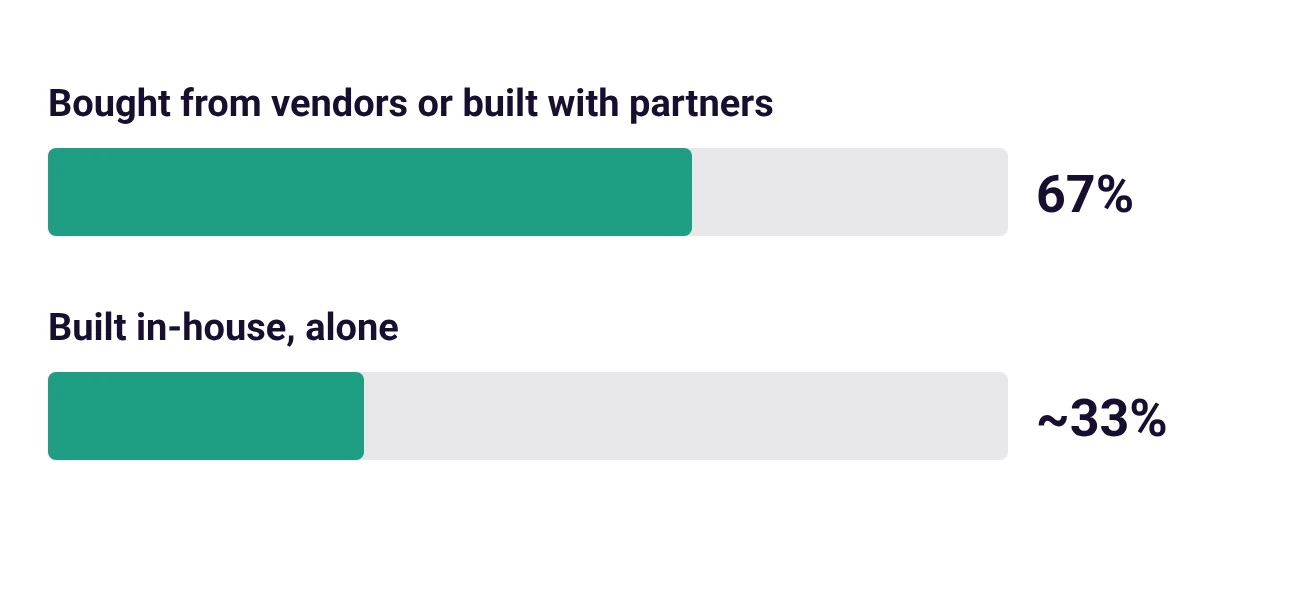
Reality check: the real dividing line isn’t custom vs off-the-shelf. It’s whether someone accountable keeps adapting the system after launch. A purchased tool nobody tunes fails just as reliably as an in-house build nobody maintains.
Here’s what most guides get wrong: they frame custom AI as the “advanced” choice and off-the-shelf as the “starter” choice. In practice, the companies getting results pick one painful workflow, buy wherever buying works, and build only the part that genuinely needs it, often with outside help.
What is a hybrid AI approach and when does it win?
A hybrid approach uses off-the-shelf AI for common tasks and custom AI for the one or two workflows that matter most, often connected so they share data and context. In our experience, it fits most companies large enough to have more than one team using AI.
A typical hybrid setup looks like this:
- Company-wide: Microsoft 365 Copilot or Gemini for documents, email and meetings.
- Team tools: GitHub Copilot for engineers, the AI features inside your CRM for sales.
- One custom layer: a workflow assistant built on a foundation model and grounded in your data, sitting inside the system where the work happens.
- Glue: AI integration with the systems you already run, so tools don’t become isolated islands.
The custom layer usually uses the same models the off-the-shelf tools do. You’re paying for fit, data access and control, not for a better brain.
How do you decide between custom AI and off-the-shelf AI step by step?
Score each workflow separately on six questions, then buy, configure or build based on the total. Doing this per workflow instead of per company stops one loud use case from setting the strategy for everything.
- Is this workflow how you compete? If customers would notice it working better, score 2. If it’s back-office routine, score 0.
- Does it depend on data no vendor has? Proprietary records, documents or history score 2.
- How many systems does it touch? One supported platform scores 0. Three or more, including in-house tools, score 2.
- How much volume is there? Thousands of cases a month score 2. A few dozen score 0.
- What’s the cost of a wrong answer? Money, legal or safety impact scores 2, because you’ll want your own controls and audit trail.
- Do you have an owner? If no one will own accuracy after launch, subtract 3. This one matters more than people expect.
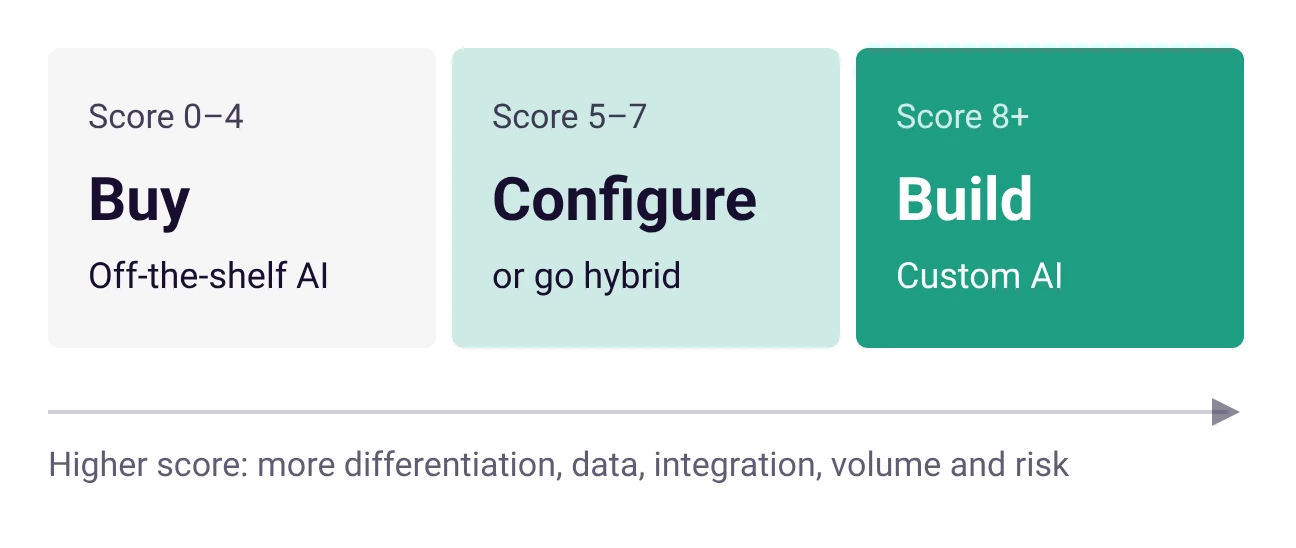
How to read the score: 0–4 means buy off-the-shelf AI. 5–7 means configure a platform or go hybrid. 8 or more means custom AI is likely worth it, ideally starting with a time-boxed discovery phase.
What’s a quick test before you commit?
Run the off-the-shelf tool on 100 real cases for 30 days and count the workarounds. If it handles most cases cleanly, keep it. If staff keep copying data between screens or fixing the same mistakes, you’ve just written the requirements for a custom build.
That bake-off costs little and settles internal debates with evidence. We describe how to turn findings like these into a build plan in how ideas become software people actually use.
What mistakes do companies make with this decision?
The most common mistakes are deciding company-wide instead of per workflow, building what could be bought, and buying “agents” that are really chatbots with new branding. All of them are avoidable.
Relatable moment: a team buys 300 AI seats, sees heavy use in month one, and finds half the licenses idle by month four, while the one workflow that needed real help never got it.
- Buying seats for everyone on day one. Start with the teams that have a clear use, then expand based on actual usage data.
- Building a chatbot that a help desk add-on already does. If your platform’s native AI covers it, use it and spend the build budget elsewhere.
- Falling for agent washing. Ask any “agentic” vendor to show the system completing a multi-step task in your environment, with logs, before you sign.
- Ignoring exit costs. Check whether you can export your data, prompts and configurations before you commit to an annual contract.
- Treating custom AI as a one-time project. Budget for upkeep from day one, or the system will quietly degrade. For rules-heavy work with no judgment involved, plain business process automation may beat both options.
How do you choose a partner if you go custom?
Choose a partner who will tell you when to buy instead of build, and who puts the evaluation plan in writing before any code. A good partner treats “you don’t need us for this part” as a normal answer.
Ask these questions in the first call:
- Which parts of this would you buy off the shelf, and why?
- How will you measure accuracy before launch, and on whose data?
- Which model providers can we switch between without a rebuild?
- Who owns the code, prompts and evaluation sets?
- What happens when the system isn’t sure of an answer?
- Can we see a system you built that’s still running after a year?
Our AI service desk build is one example: it automates about 60% of tickets inside the ServiceNow and Ivanti screens agents already use. The right engagement model matters too, and you can compare engagement models from fixed-scope delivery to dedicated teams.
Frequently Asked Questions
Is custom AI better than off-the-shelf AI?
Neither is better in general. Off-the-shelf AI wins for common tasks like writing, summarizing and standard support, because it’s fast, cheap to start and vendor-maintained. Custom AI wins for workflows that depend on your own data and systems and set you apart from competitors. Most companies get the best results by using both.
How much does custom AI cost compared to off-the-shelf AI?
Off-the-shelf AI typically costs a monthly fee per user, for example $30 per user per month for Microsoft 365 Copilot on an annual commitment. A focused custom AI build usually costs $25,000 to $180,000 upfront, plus 15–25% of that per year for upkeep and model usage. Off-the-shelf is cheaper in year one, and licensing only the people who need it is often cheapest overall; custom pays off when it handles work the off-the-shelf tool can’t.
Can off-the-shelf AI be customized?
Yes, within limits. Platforms like Copilot Studio, Custom GPTs and Salesforce Agentforce let you configure assistants with your instructions and connected data. You’re still bound by the vendor’s integrations, data rules and roadmap. When you need deep links to in-house systems or your own approval logic, you’ve reached the edge of configuration.
Do I need to train my own AI model to get custom AI?
Usually not. Most custom AI today is built on existing models from OpenAI, Anthropic, Google or open-weight families like Llama, with the custom work in data retrieval, integration and evaluation. Training your own model only makes sense with large proprietary datasets and a task general models measurably fail at, such as fraud scoring or visual inspection.
Is off-the-shelf AI safe for sensitive data?
Enterprise tiers from major vendors offer strong security, compliance certifications and commitments not to train on your data. The bigger risk is usually inside your own company: AI tools surface anything a user can access, so messy permissions become a data leak. Clean up access rights before rollout, and choose custom AI when regulations require control over where data is processed.
How long does it take to switch from off-the-shelf AI to custom AI?
A focused custom replacement typically takes 8–16 weeks after a 2–4 week discovery phase. The off-the-shelf period isn’t wasted, because real usage shows exactly which cases the custom system must handle. Plan the switch around your contract renewal date to avoid paying for both longer than needed.
Should a small business choose custom AI or off-the-shelf AI?
A small business should start with off-the-shelf AI in almost every case. The exception is when one high-volume task, like quoting or document processing, is core to the business and no tool handles it well. In that case, a narrow custom pilot in the $25,000–$60,000 range can pay for itself, as long as someone owns it after launch.